|
Friday, November 21. 2008
I've been whining a lot lately about how SQL Server 2008 (and none of the other SQL Server's)
have a generate_series() function that I have grown to love in PostgreSQL. Admittedly I've just been too lazy to
create one even though its not that difficult of a task.
Simon Greener over at Spatial DBAdvisor heard my whining and I guess got fed up enough
to create a generate_series() function for SQL Server 2008.
He also has a generate_series function for Oracle too by the way.
Now there are a couple of differences between the way you use it in the 3 databases which are caused
by fundamental differences between the architectures of the 3 databases.
Continue reading "Chocolate and Peanut Butter Cross-Breeding with PostgreSQL, SQL Server 2008, and Oracle"
Friday, October 12. 2007
Map Crushers and Silverlight
My husband, Leo, and I went to the Re-MIX Boston conference recently. They have posted some videos of some of the Boston Re-Mix sessions and more are coming in case anyone wants to see them.
On the GIS Microsoft Virtual Earth Front
I attended the Virtual Earth presentation. I didn't get too much out of it that I didn't know already except for 2 points.
- I spoke to Scott Ellington from MapDotNet who was in the audience and he said MapDotNet supports PostGIS. I knew MapDotNet would be supporting SQL Server 2008 when it comes out and currently supported SQL Server 2005 and Arc SDE, but this tidbit of news was news to me.
- One of the items showcased was a free product from Microsoft Research called MSR Map Cruncher which allows one to pre-create custom map tiles at various VEarth Zoom Levels to overlay on Microsoft Virtual Earth. I'm not sure what commercial restrictions it has if any, but this tool is basically a poor man's tile cache.
On the Silverlight front
- First Silverlight 1.0 just got released in the past few weeks and people have started to make bouncing balls using it. In fact most of the Silverlight presentations had
some variant of media player and bouncing balls. Kind of disappointing.
- The current incarnation is lacking on pre-packaged controls, can only be client-side script controlled with javascript and generally seems to be annoying as far as integrating with web apps goes.
- The real stuff is in Silverlight 1.1 with DLR (IronPython, IronRuby, etc.) which is currently in Alpha and more useful controls forthcoming. This will be out in an 8-12 month timeframe. The alpha is out but will change a great deal before final release.
- I went to a talk given by Miguel De Icaza of Novell and Mono fame and it is official that Novell and Microsoft have an agreement where Novell will provide Silverlight compatibility on
all Linux distros via Moonlight. It also sounds like Silverlight will deploy similar to Flash where a user is prompted to install when visiting a Silverlight page and the download will be between 1-4 MB.
- Sadly the neat Moonlight desklets are a Mono/Moonlight enhancement and not part of Silverlight spec and rely on something Miguel called "compass" (I'm sure I'm spelling it wrong), which he thinks is only supported on Linux .
- In one of the AJAX talks we went to, they demonstrated that the VS 2008 CTP AKA Orcas - supports intellisense of javascript and some more advanced goodies for supporting debugging of javascript such as breakpoint etc.
Map Dicing in Spatial Databases: PostGIS Example
The Microsoft Virtual Earth presentation did get me thinking about map dicing in spatial databases. Normally when I get maps, I get them on a silver platter - already at the lowest granularity I need.
But on rare occasions I would have liked to dice up the data more.
Why would you want to do this in a spatial database - particularly PostGIS? For one - the more granular your data, the more generally useful your spatial indexes since they more closely mirror your actual data and also it is speedier for statistical aggregation and doing thematic maps when spatial joining with bigger pieces if you know that your smaller pieces can be fully contained in your larger area of interest. To a point though - at a certain point the over-head of the additional records counteracts the benefits of more useful indexing and also your indexes just become less useful for other reasons.
Anyrate, the approach I am about to show may not be the best since its something I thought up in my sleep.
The basic approach I would use to dice up say US state boundaries or Massachusetts towns or say census blocks into smaller rectangular quadrants - would be to first create a grid of the extent of the area broken out in even rectangles of x width and y height and then do an intersection with my map of interest to get a new diced map.
I will not only dice space - but I shall also pseudo-dice attribute data. I say pseudo because I am going to assume that things like population density etc. are even across each town boundary which we know is not true. For data such as census blocks and depending how low you dice, this assumption may not be so inaccurate.
For those not familiar with the wonders of spatial intersection - take a peak at our explanation of ST_Intersection and ST_Intersects complete with sample diagrams.
This technique uses OGC standard functions so should work as well with slight variation in syntax in other spatial databases such as Oracle Spatial, IBM DB Spatial Extender, MSSQL Spatial etc. The only part not OGC compliant is my use of the PostgreSQL specific function generate_series, but this can be easily simulated in other databases by creating a dummy table of numbers say from 0 to 10000.
The following SQL calls demonstrate this approach. I would be interested in learning how real GIS people do this kind of thing.
Step 1 - Get the data of interest and load it - for this I will be using TOWNSSURVEY_POLYM from MassGIS.
Note psql and pgsql2shp are located in the PostgreSQL bin folder.
shp2pgsql -s 26986 TOWNSSURVEY_POLYM public.towns > towns.sql
psql -h myserver -d mydb -U myuser -f towns.sql
psql -h myserver -d mydb -U myuser -c "CREATE INDEX idx_towns_the_geom ON towns USING gist(the_geom);"
Step 2 - Figure out the extent of your data and the size rectangle you will need to create. For this I want to know what size rectangle
to make a 200x200 grid (~40000 rows of grid data).
SELECT ceiling((ST_xmax(ST_Extent(the_geom)) - ST_xmin(ST_Extent(the_geom)))/200) as width,
    ceiling((ST_ymax(ST_Extent(the_geom)) - ST_ymin(ST_Extent(the_geom)))/200) as height,
    ST_Extent(the_geom) as thee
    FROM towns
Step 3 - Make our throw away grid - alas we found a good use for a cartesian product
In case it is not quite clear to folks what I am doing here - here it is in simple english
Create a reference box starting at the origin of our extent of massachusetts that is of dimension 1485x911 meters - in quasi OGC notation - BOX(xorigin yorigin, (xorigin + 1485) (yorigin + 911))
Next take this box and use it as a paint brush to paint across and then down by translating it hor.n*1485, ver.n*911
CREATE TABLE throwaway_grid(gid SERIAL PRIMARY KEY);
SELECT AddGeometryColumn('public', 'throwaway_grid', 'the_geom', 26986, 'POLYGON', 2);

INSERT INTO throwaway_grid(the_geom)
SELECT ST_translate(ref.boxrep, hor.n*width, ver.n*height) As slice
FROM
(SELECT ST_xmin(ST_Extent(the_geom)) As xstart, ST_xmin(ST_Extent(the_geom)) as ystart, ST_SetSRID(CAST('BOX(33863.73046875 777606.3125,35348.73046875 778517.3125)' as box2d), 26986) as boxrep,
ceiling((ST_xmax(ST_Extent(the_geom)) - ST_xmin(ST_Extent(the_geom)))/200) as width,
    ceiling((ST_ymax(ST_Extent(the_geom)) - ST_ymin(ST_Extent(the_geom)))/200) as height
FROM towns) As ref, generate_series(1,200) as hor(n), generate_series(1,200) as ver(n);

CREATE INDEX idx_throwaway_grid_the_geom ON throwaway_grid USING gist(the_geom);
Step 4 - Create our final dataset - the towns nicely diced up into smaller rectangler shapes
CREATE TABLE towns_grid
(
  gid serial NOT NULL PRIMARY KEY,
  objectid integer,
  town character varying(21),
  town_id smallint,
  pop1980 integer,
  pop1990 integer,
  pop2000 integer,
  popch80_90 smallint,
  popch90_00 integer,
  "type" character varying(2),
  fourcolor smallint,
  fips_stco integer,
  sum_acres double precision,
  sum_square double precision
);

SELECT AddGeometryColumn('public', 'towns_grid', 'the_geom', 26986, 'MULTIPOLYGON', 2);

--Query returned successfully: 22713 rows affected, 1273117 ms execution time.
INSERT INTO towns_grid(objectid, town, town_id, pop1980, pop1990, pop2000, popch80_90,
       popch90_00, "type", fourcolor, fips_stco, sum_acres, sum_square,
       the_geom)
SELECT objectid, town, town_id,
    pop1980*ST_Area(ST_Intersection(t.the_geom, tg.the_geom))/ST_Area(t.the_geom),
    pop1990*ST_Area(ST_Intersection(t.the_geom, tg.the_geom))/ST_Area(t.the_geom),
    pop2000*ST_Area(ST_Intersection(t.the_geom, tg.the_geom))/ST_Area(t.the_geom),
    popch80_90*ST_Area(ST_Intersection(t.the_geom, tg.the_geom))/ST_Area(t.the_geom),
       popch90_00*ST_Area(ST_Intersection(t.the_geom, tg.the_geom))/ST_Area(t.the_geom), "type", fourcolor, fips_stco, sum_acres*ST_Area(ST_Intersection(t.the_geom, tg.the_geom))/ST_Area(t.the_geom),
    sum_square*ST_Area(ST_Intersection(t.the_geom, tg.the_geom))/ST_Area(t.the_geom),
       ST_multi(ST_Intersection(t.the_geom, tg.the_geom))
  FROM towns t INNER JOIN throwaway_grid tg ON ST_Intersects(t.the_geom, tg.the_geom);

CREATE INDEX idx_towns_grid_the_geom ON towns_grid USING gist(the_geom);
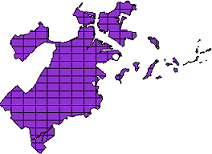
Before and After pictures
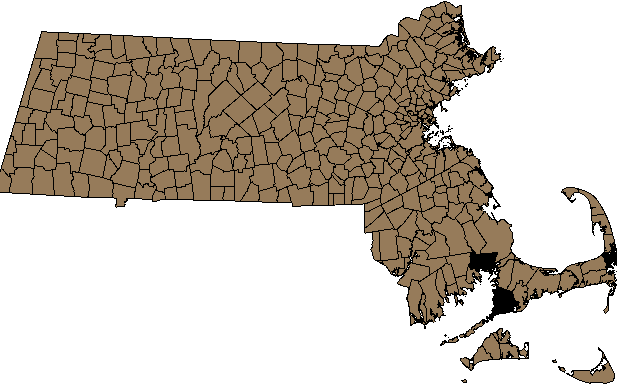
Massachusetts Town Boundary (towns) - Before - 351 records
 |
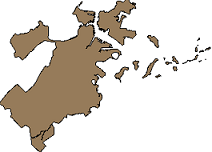
SELECT gid, the_geom
FROM towns
WHERE town = 'BOSTON' -- 1 record
 |
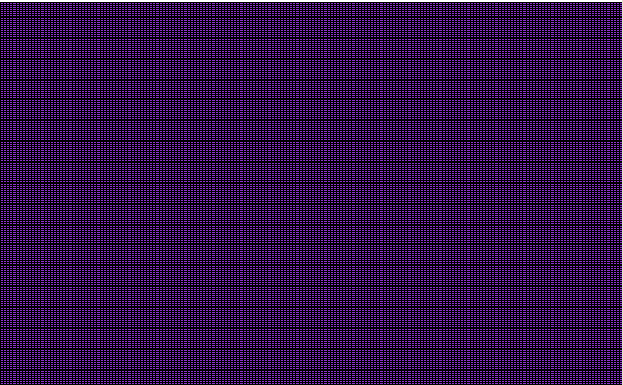
Massachusetts Extent Diced into Rectangles - 40,000 records
 |
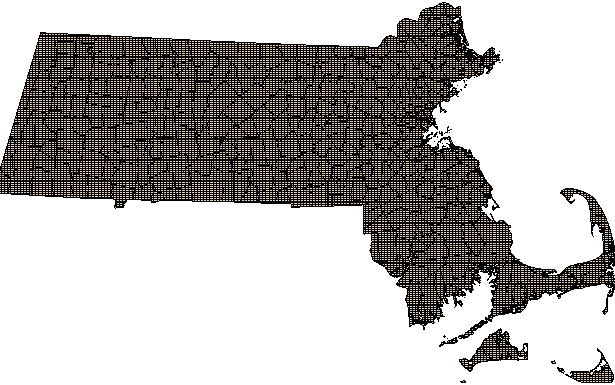
Massachusetts Town (towns_grid) - After Dicing - 22,713 records
 |
SELECT gid, the_geom
FROM towns_grid
WHERE town = 'BOSTON' -- 175 records
 |
Tuesday, October 02. 2007
PostGIS generate_series tricks
generate_series comes in particularly handy for manipulating geometries in a database. The following examples are done using Postgis 1.3.1. Below are some common use cases
/**break multipolygon geometries into single polygon geometries ***/
INSERT INTO mypoly(the_geom)
SELECT ST_GeometryN(the_geom, generate_series(1, ST_NumGeometries(the_geom))) AS poly
    FROM mymultipoly
/**The ST_ExteriorRing function only takes Polygons. If each of your geometries
is a multipolygon and you wanted use ST_ExteriorRing
to get the exterior line string of
each polygon in each polygon, you would do something like the below. **/

 SELECT a.gid, ST_ExteriorRing(ST_GeometryN(a.the_geom,ST_NumGeometries(a.the_geom))) AS a_singlelinenoholes
    FROM somegeomtable a
/** If you wanted to do the above but still maintain
    the same number of records as before, you would do this - which would give you a
    multilinestring geometry where each linestring represents
    an exterior of each polygon
**/
 SELECT a.gid, ST_Collect(ST_ExteriorRing(ST_GeometryN(a.the_geom,ST_NumGeometries(a.the_geom)))) AS a_multilinesnoholes
    FROM somegeomtable a
    GROUP BY a.gid
NOTE: Because of the way generate_series works we can't have 2 generate series calls in the SELECT.
So if we need an inner and outer loop then we put one in the SELECT and one in the FROM and have a limiting WHERE clause as shown in the below.
/**Get all interior linestring rings (holes) of a multipolygon into a separate table
with one record per interior ring. **/
 SELECT ST_BuildArea(ST_InteriorRingN(ST_GeometryN(a.the_geom,gn.n),generate_series(1,ST_NumInteriorRings(ST_GeometryN(a.the_geom,gn.n))) )) AS a_hole
    FROM somegeomtable a,
            generate_series(1, (SELECT Max(ST_NumGeometries(the_geom)) FROM somegeomtable)) gn(n)
    WHERE ST_NumGeometries(the_geom) >= gn.n  AND ST_NumInteriorRings(ST_GeometryN(the_geom,gn.n)) > 0
To a Database programmer all problems look like database problems
Doing a lot of database programming warps your thinking. Normally I would consider thinking in the languages you program in to be a bad thing because to some
extent it limits your thinking to what is supported in said language. In general I think doing a lot of database programming has had positive effects on me.
I find myself thinking about problems in parallel, unencumbered by the optical illusions of step dependency, and instead grouping problems in sets.
It seems that regardless of what language I program in, I see sets and patterns
everywhere. When that happens I can't help but hit that particular nail with a database hammer.
Below is a PostgreSQL example that uses generate_series to generate ASP.NET gridview column markup for a month column cross tab. Originally I used
AutogenerateColumns=true property of a grid view, but I needed to manipulate the formatting of my columns so that was a bit less than satisfying.
The code below generates a markup record for each grid view month column
SELECT '<asp:BoundField DataField="' || trim(to_char(date '2007-01-01' + (n || ' month')::interval, 'Month'))
    || '" HeaderText="' || trim(to_char(date '2007-01-01' + (n || ' month')::interval, 'Mon'))
    || '" ItemStyle-HorizontalAlign="Center" />'  as newval
        FROM generate_series(0,11) n
If you were to change the code above to add a SUM aggregate function on strings - (definition of a PostgreSQL SUM aggregate for text you can find here)
you would get just one row with all your markup. For this particular one we also created a column that returns the corresponding SQL for the cross tab query.
SELECT '<asp:GridView id="grv" runat="server">' || E'\r\n' || SUM('<asp:BoundField DataField="' || mth.long_mname
    || '" HeaderText="' || mth.short_mname
    || '" ItemStyle-HorizontalAlign="Center" />' || E'\r\n') || '</asp:GridView>' as aspxmarkup,
'SELECT ' ||
    SUM('SUM(CASE WHEN report_date BETWEEN \'' || mth.start_date
    || '\' AND \''
    || mth.end_date
    || '\' THEN amount ELSE NULL END) As '
    || mth.long_mname
    || ', ' ||  E'\r\n') || ' SUM(amount) As total ' || E'\r\n'
    || ' FROM sometable WHERE report_date between \'2007-01-01\' AND \'2007-12-31\'' as sqlcrosstab
  FROM
        (SELECT (n + 1) As mnum,
            trim(to_char(date '2007-01-01' + (n || ' month')::interval, 'Mon')) As short_mname,
            trim(to_char(date '2007-01-01' + (n || ' month')::interval, 'Month')) As long_mname,
            date '2007-01-01' + (n || ' month')::interval As start_date,
            date '2007-01-01' + ((n + 1) || ' month')::interval +  - '1 day'::interval As end_date
         FROM generate_series(0,11) n) As mth
The gridview markup output of the aspxmarkup column looks like this
<asp:GridView id="grv" runat="server" >
<asp:BoundField DataField="January" HeaderText="Jan" ItemStyle-HorizontalAlign="Center" />
<asp:BoundField DataField="February" HeaderText="Feb" ItemStyle-HorizontalAlign="Center" />
<asp:BoundField DataField="March" HeaderText="Mar" ItemStyle-HorizontalAlign="Center" />
<asp:BoundField DataField="April" HeaderText="Apr" ItemStyle-HorizontalAlign="Center" />
<asp:BoundField DataField="May" HeaderText="May" ItemStyle-HorizontalAlign="Center" />
<asp:BoundField DataField="June" HeaderText="Jun" ItemStyle-HorizontalAlign="Center" />
<asp:BoundField DataField="July" HeaderText="Jul" ItemStyle-HorizontalAlign="Center" />
<asp:BoundField DataField="August" HeaderText="Aug" ItemStyle-HorizontalAlign="Center" />
<asp:BoundField DataField="September" HeaderText="Sep" ItemStyle-HorizontalAlign="Center" />
<asp:BoundField DataField="October" HeaderText="Oct" ItemStyle-HorizontalAlign="Center" />
<asp:BoundField DataField="November" HeaderText="Nov" ItemStyle-HorizontalAlign="Center" />
<asp:BoundField DataField="December" HeaderText="Dec" ItemStyle-HorizontalAlign="Center" />
</asp:GridView>
And the Sql output of the sqlcrosstab column looks like this
SELECT SUM(CASE WHEN report_date BETWEEN '2007-01-01 00:00:00' AND '2007-01-31 00:00:00' THEN amount ELSE NULL END) As January,
SUM(CASE WHEN report_date BETWEEN '2007-02-01 00:00:00' AND '2007-02-28 00:00:00' THEN amount ELSE NULL END) As February,
SUM(CASE WHEN report_date BETWEEN '2007-03-01 00:00:00' AND '2007-03-31 00:00:00' THEN amount ELSE NULL END) As March,
SUM(CASE WHEN report_date BETWEEN '2007-04-01 00:00:00' AND '2007-04-30 00:00:00' THEN amount ELSE NULL END) As April,
SUM(CASE WHEN report_date BETWEEN '2007-05-01 00:00:00' AND '2007-05-31 00:00:00' THEN amount ELSE NULL END) As May,
SUM(CASE WHEN report_date BETWEEN '2007-06-01 00:00:00' AND '2007-06-30 00:00:00' THEN amount ELSE NULL END) As June,
SUM(CASE WHEN report_date BETWEEN '2007-07-01 00:00:00' AND '2007-07-31 00:00:00' THEN amount ELSE NULL END) As July,
SUM(CASE WHEN report_date BETWEEN '2007-08-01 00:00:00' AND '2007-08-31 00:00:00' THEN amount ELSE NULL END) As August,
SUM(CASE WHEN report_date BETWEEN '2007-09-01 00:00:00' AND '2007-09-30 00:00:00' THEN amount ELSE NULL END) As September,
SUM(CASE WHEN report_date BETWEEN '2007-10-01 00:00:00' AND '2007-10-31 00:00:00' THEN amount ELSE NULL END) As October,
SUM(CASE WHEN report_date BETWEEN '2007-11-01 00:00:00' AND '2007-11-30 00:00:00' THEN amount ELSE NULL END) As November,
SUM(CASE WHEN report_date BETWEEN '2007-12-01 00:00:00' AND '2007-12-31 00:00:00' THEN amount ELSE NULL END) As December,
 SUM(amount) As total
 FROM sometable WHERE report_date between '2007-01-01' AND '2007-12-31'
Saturday, September 15. 2007
One of my favorite functions in PostgreSQL is the generate_series(x,y) function. What this little function does is to generate a
set of numbers from x to y. Being able to generate a sequence of numbers has so many uses that its really hard to itemize them all. For this particular entry I thought I would share a particular use of it in generating test data.
Often times you need to generate data for various test cases or you need to generate a lot of data to test out your speed of queries and
for benchmarking. Below is a quick query that uses some postgis functions, generate_series, and the PostgreSQL random() function to create a test table, and populate it with 500 random circles around Boston. Each circle being of various sizes. This is in longlat projection.
CREATE TABLE testcase(gid serial primary key);
SELECT AddGeometryColumn('public', 'testcase', 'the_geom', 4326, 'POLYGON', 2);

INSERT INTO testcase(the_geom)
    SELECT buffer(setsrid(makepoint(-71.0891380310059 + n*random()/500.00, 42.3123226165771 + n*random()/500.00),4326), n*0.0001)
        FROM generate_series(1,500) As n;

CREATE INDEX idx_testcase_the_geom  ON testcase USING gist(the_geom);
If you wanted to store the data in a different projection - you would do something like this instead. The below example will generate data in MA NAD 83 feet and create circles of radius in increments of 100 feet
CREATE TABLE testcase(gid serial primary key);
SELECT AddGeometryColumn('public', 'testcase', 'the_geom', 2249, 'POLYGON', 2);

INSERT INTO testcase(the_geom)
    SELECT buffer(transform(setsrid(makepoint(-71.0891380310059 + n*random()/500.00, 42.3123226165771 + n*random()/500.00),4326),2249), n*100)
        FROM generate_series(1,500) As n;

CREATE INDEX idx_testcase_the_geom  ON testcase USING gist(the_geom);
Note, it is possible to create elaborate spatial data using generate_series and additional functions like trigonometric functions and other postgis functions to generate more intricate patterns of spatial data fitting certain criteria.
In other databases that lack this functionality I either create it if the database is powerful enough to support set returning functions, or I resort to creating a dummy table that has nothing but numbers in it. The technique comes in especially handy when you need to create something like a sequence of dates.
|

